








What's Shapelab Max 2026?
Shapelab Max 2026 is the direct successor to Shapelab 2025. Rebranded with “Max” to signify the ultimate, full-featured creative suite for PCVR, it delivers all the well-known tools plus significant new additions. Whether you are a professional or a beginner, Shapelab Max 2026 offers the cutting-edge toolset you need for a smoother, more enjoyable 3D modeling experience.

Run Shapelab Max 2026 on PC in desktop mode, or use a VR headset tethered to your PC to run VR mode. Choose the most comfortable and efficient mode for different stages of your projects for a seamless and versatile design experience.

Work with your creations in a more natural way, as if they were physical objects right in front of you. Experience a level of immersion and depth unimaginable in traditional 2D modeling tools. Work faster, more efficiently, and with greater precision.
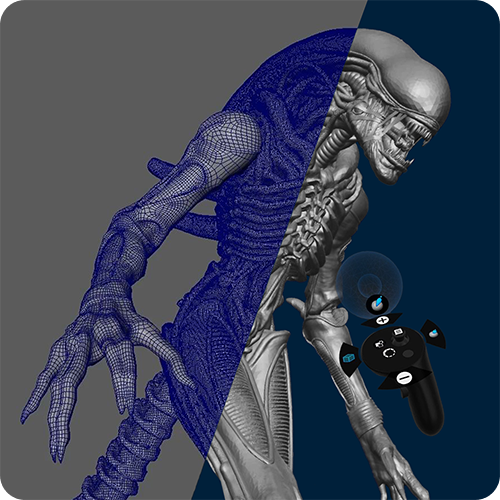
Take advantage of VR to easily sculpt high-quality 3D models, then export your work and use it in other 3D creative apps, in game engines or for 3D printing.
Key Features
- VR and Desktop Mode, Digital Pen Support
- Dual Design Engine with Both Polygon and Voxel Tools
- Global Topology Manipulation Tools and Optional Dynamic Topology Mode
- Multiresolution and Subdivison Levels
- Industry-grade Sculpting and Painting Brushes
- Customizable Work Environments
- Kitbashing with Custom Shapes and Primitives
- Snapping and Constraints
- Common File Formats Supported
- Redesigned, Rebuilt, and More Powerful Gizmo NEW
- Transform System & Non-Uniform Scaling NEW
- Elastic Move Tool NEW
- ...And More!
Special Launch Offer

Shapelab Max 2026 (PCVR)
special 30%* discount on the perpetual license or annual subscription (*Higher individual discounts may apply; please check your email for personalized offers.)

Shapelab Max Standalone
free license of Shapelab Max for Meta Quest 3/3S and Pro. Experience the features of Shapelab Max, no PC required! Learn how to request access here.
Shapelab users
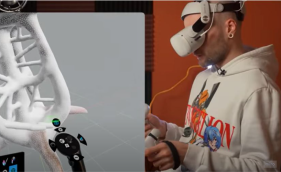
BoroCG
Digital Artist, Content creator
“The most exciting part in Shapelab for me is how stable, reliable and innovative the remeshing algorithm is. You can create very precise detail with roughness and color and it takes care of all the topology at the same time. Incredible!”

Grant Abbitt
Digital Artist, Content creator
“I’ve become a VR convert now after trying out this sculpting program. It’s very intuitive, easy-to-use and makes sculpting really fun!”

Danny Mac 3D
Digital Artist, Content creator
“As I started to get the hang of it, I started to better appreciate just how much better it is to be able to see and manipulate the sculpt right there in front of you. It’s like it’s physically in front of you.”
FAQs
Shapelab comes in two tiers: Max and Lite.
Shapelab Max packs in every feature your platform can handle, supporting both PCVR on Windows and standalone VR on devices like Meta Quest. It’s the full creative suite for serious creators, now available across multiple VR platforms.
- Shapelab Max 2026 is the PCVR version. It can be used in oth desktop mode, and VR mode, with a headset tethered to your PC. It is a robust and full-featured sculpting software including all the latest features of Shapelab.
- Shapelab Max Standalone includes most features of the PCVR version, and runs on Meta Quest 3/3S and Pro headsets, with no PC required.
Shapelab Lite delivers the core creative tools in a sleek, affordable package, available on standalone VR platforms, namely on Meta Quest and Pico, perfect for creators getting started with immersive 3D.
The minimum requirements for Shapelab Max (PCVR) are:
- OS: Windows™ 10 or later
- Processor: Intel™ Core™ i5-4590 or AMD FX™ 8350, equivalent or better
- Memory: 8 GB RAM
- Graphics: NVIDIA GeForce™ GTX 1060 or AMD Radeon™ RX 480, equivalent or better
- Storage: approximately 800 MB available space
Shapelab supports HTC Vive, Valve index, Oculus Quest headsets (with link cable) and Windows Mixed Reality devices.
Please see all system requirements here.
Although all the officially supported headsets are listed above, any headset should be compatible with Shapelab that can run SteamVR.
For the best performance make sure to tether your headset to your PC via cable. Air Link connection can sometimes result in performance issues.
You can find our user manual here.
You can import and export in FBX, OBJ, GLB and STL. You can also save your projects as SL3D (Shapelab project file) to keep the settings of your scene.
Yes, you can export your designs in STL, OBJ and GLB formats, which are supported by almost every slicer software.
Tip: Take care of your creations’ topology in order to get a printable result. Use the smooth tool often, consider voxel remeshing and you can also automatically close holes on the objects.
Yes, you can export your work in FBX, OBJ, GLB and STL and use them in other programs, such as Blender, Substance Painter, Unity, etc.
Shapelab Max leverages VR technology to offer an immersive and intuitive sculpting experience, enabling you to work seamlessly in 3D space with unparalleled control and creative freedom. You can easily navigate in 3D, interact with your designs as if they were right in front of you. With your VR controllers, you can move, scale, adjust focus, and create 3D brushstrokes naturally, easily shaping complex designs with simple hand movements. This level of immersion is impossible to achieve in traditional desktop software and can boost productivity, allowing you to work faster, more efficiently, and often with greater precision.
At its core, Shapelab uses a robust polygon mesh-based design engine, ideal for professional-grade modeling workflows and high-detail sculpting. Shapelab Max recently also introduced a voxel engine as a secondary design system. This hybrid approach lets users quickly block out ideas with voxel sculpting, while still relying on the precision and export-ready features of polygon-based modeling for final production.
The primary function of Shapelab is organic modeling, however there are several tools that facilitate cleaning up and editing 3D scans. Please visit our guide for more details on the current tools.
While Shapelab may not be suitable for accurate retopology in its current form, it does offer several tools to modify the topology of your mesh. Please visit our guide for more details on the current tools.
